Skip to content
11,086 Devices Shipped.11,086 Shipped
Trusted by Scientists since 2019.Scientist Trusted
Recommended to their patients by doctors.Doctor Recommended

Full-parameter
Your protocol

Bespoke Tone

The tone you specify, not the one we picked. Set every stimulation parameter yourself - from a paper, from a clinician, or from what you have learned works for you - and it is written to your device exactly as entered.

6Settings you set
1-100Hz frequency range
2x10Char device label
$39.00
Every parameter written exactly as you set it
Instant delivery to your Vagal Tones app
One-time purchase, yours forever
Configure yours

The configurator on this page is where the tone is built - there is no default to buy.

Share it with a Tone Code No subscription Secure checkout

Signal
Hz

1 to 100 Hz. 25 Hz is the most studied frequency for vagus nerve stimulation.

us
15 - 1000 us. Wider = stronger sensation.
us
15 - 500 us. Gap between pulse halves.
Pulse shape

Each waveform interacts differently with nerve tissue. Symmetric is the most comfortable and works on every device.

Symmetric
Symmetric
Equal phases both directions. Charge-balanced, comfortable, well-studied.
All devices
Alternating
Alternating
Flips leading polarity each cycle. Balanced nerve fibre recruitment.
Buddy or Oh
Asymmetric
Asymmetric
Full active phase, sub-threshold return. Higher per-pulse efficiency.
Buddy or Oh
Monophasic
Monophasic
Active phase only. Maximum per-pulse efficiency. Watch skin contact.
Buddy or Oh
Session
minutes
1 to 60 minutes.
mA
0.1 - 4.0 mA.
This is a ceiling, not a fixed level. During your session you adjust intensity on the device itself until it feels right. Most people settle well below the target.
Duty cycle
On-off cycling

Instead of stimulating the whole time, duty cycling alternates between active and rest periods. This gives your nerve time to reset and can reduce habituation over longer sessions.

No cyclingAlways on
5s / 5sBreathing-synced
30s / 30sStandard clinical
60s / 60sExtended rest
sec
/
sec
The 5/5 pattern works well timed to slow breathing: inhale during stimulation, exhale during rest. Sclocco et al. (2019) found that respiratory-gated vagal stimulation produced stronger brainstem responses than continuous delivery.
Your device label
Give it a name

This is what appears on your device screen. Two lines, ten characters each. Leave blank for an auto-generated label based on your settings.

0 / 10
0 / 10
Call it whatever makes sense to you: your protocol name, your clinician's shorthand, a reminder of what it's for.
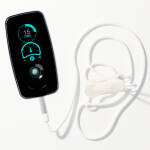
OLED preview
Ready to load to your device.
25Hz 250us 20min
Bespoke Tone
25 Hz symmetric · 250 us · 20min
$39.00

Bespoke Tone

Any frequency from 1 to 100 Hz

Frequency is how many pulses reach the nerve each second. It is the single most studied variable in vagus nerve stimulation, and the one most likely to be specified in a protocol. Bespoke lets you set it exactly, to the hertz.

1-10 Hz

Low and slow

Widely spaced pulses. People who find stimulation sharp or intrusive often prefer this range, which is why our Gentle Rhythms protocol sits at 8 Hz and Recover at 10 Hz. Low frequencies feel more like a slow tap than a buzz.

20-30 Hz

The studied middle

If a paper specifies a frequency for transcutaneous auricular stimulation, it is most often in here, and 25 Hz most often of all. Our Nightshift, Balance, Calm and Uplift protocols all sit in this band. Start here unless you have a reason not to.

50-100 Hz

Higher and denser

Pulses arrive close together and the sensation smooths out into something more continuous. Our Digestion protocol uses 75 Hz. Higher frequencies leave less gap between pulses, which becomes a real constraint once you widen the pulse itself.

Why we stop at 100

The hardware will accept far more than 100 Hz, and the Research Edition exposes the full range. We cap Bespoke at 100 because published transcutaneous auricular protocols essentially all live below it, and because frequency and pulse width compete for room inside each cycle. At 100 Hz a cycle is 10,000 microseconds wide. Ask for a 1,000 microsecond pulse at that rate and it still fits. Ask for much more and it does not, and the device physically cannot deliver what you configured. The builder checks this arithmetic as you change the settings and tells you before you order, rather than letting you discover it on your ear.


New in Bespoke

Set the shape of the pulse, not just how often it arrives

My Tone let you pick a frequency. Bespoke lets you set the pulse itself: how long each phase lasts, and how long the gap between the two halves is. These are the settings that change how stimulation feels at the same intensity, and they are the ones research protocols are most likely to specify alongside frequency.

phase interphase interpulse gap - whatever is left of the cycle one cycle, set by frequency
Phase · 50 to 1000 us

Pulse width

How long each half of the pulse lasts, in microseconds. A wider pulse delivers more charge per pulse, so at the same current it feels stronger. If stimulation is uncomfortable at the current you need, narrowing the pulse is often a better move than dropping the current.

Our own protocols range from 100 microseconds on Nightshift to 500 on Uplift. That fivefold spread is deliberate, and it is a big part of why those two tones feel so different.

Interphase · 50 to 500 us

Interphase interval

The pause between the positive and negative halves of each pulse. Our stimulation is charge-balanced by design, meaning what goes in comes back out, which is what stops charge accumulating in tissue. The interphase interval is the breathing space between those two halves.

Every Vagal protocol ships at 100 microseconds. Widening it separates the two phases further; narrowing it brings them closer to a single continuous swing.

The arithmetic that constrains you, shown live

A pulse has to fit inside its own cycle. At 25 Hz each cycle is 40,000 microseconds long, and a 250 microsecond pulse with a 100 microsecond interphase occupies 600 of them, leaving 39,400 microseconds of gap. Comfortable. But raise the frequency to 500 Hz and the cycle shrinks to 2,000 microseconds. Ask for a 1,000 microsecond pulse there and it needs 2,100. There is no room, and the device cannot deliver it.

The configurator computes this on every change and tells you the period, the pulse width and the remaining gap. If a combination will not fit, it says so plainly and will not let you buy it. This is not a warning buried in documentation, it is arithmetic the hardware enforces, so we enforce it first.


New in Bespoke

Four waveform modes

Until now every tone we sold was symmetric biphasic, because that is the only shape the hardware exposed. Vagal Buddy and Vagal Oh! now expose four, and Bespoke is the first product where you choose. This is the control most likely to appear in a research protocol and be impossible to reproduce on consumer hardware.

Symmetric biphasic every device

Equal and opposite halves. Charge in exactly balances charge out, which is why it is the safe default and why every Vagal protocol has used it. Works on every device and every firmware version we have shipped. If a protocol does not specify a waveform, this is what it means.

Alternating Buddy & Oh!

Still balanced, but the leading polarity flips on every pulse: positive first, then negative first, then back. The intent is to avoid the nerve settling into a fixed response to a fixed direction. Sensation is usually described as slightly less pointed than symmetric at the same settings.

Asymmetric Buddy & Oh!

A short tall phase followed by a long shallow one. The areas still match, so charge stays balanced, but the peak is concentrated into the first half. Used where the aim is a strong leading edge without increasing total charge. Often reported as sharper at onset and quieter after.

Monophasic Buddy & Oh!

One direction only, with no returning phase. It is the shape most often used in older literature, so you may need it to reproduce a published protocol. Be aware that it is not charge balanced, and that is the entire reason biphasic became standard. Choose it deliberately, for a reason, and prefer shorter sessions.

Which device you need

Symmetric biphasic works on every device we have ever shipped. The other three modes need a Vagal Buddy or a Vagal Oh! The older tVNS Stimulator has no waveform control at all, and there is a right and a wrong way to handle that: the wrong way is to accept a waveform the device cannot use and let you believe you got what you asked for.

So we do not. When a Bespoke tone loads, the device is asked what it actually supports and the answer is read from the hardware itself, not guessed from the model name on the box. If your device cannot deliver the waveform you chose, the load is refused and tells you why, rather than quietly substituting symmetric biphasic and calling it done. A protocol that renders differently from the one you specified is worse than one that visibly fails.


New in Bespoke

On and off duty cycles

A continuous session runs from start to finish without pausing. A duty-cycled session alternates: stimulate for a while, rest for a while, repeat. Nerves adapt to unchanging input, so a pause is not wasted time, it is what keeps the next burst meaningful.

Continuous
One unbroken 20 minutes. Balance, Digestion, Recover, Nightshift and Gentle Rhythms all run this way.
60s on / 60s off symmetric
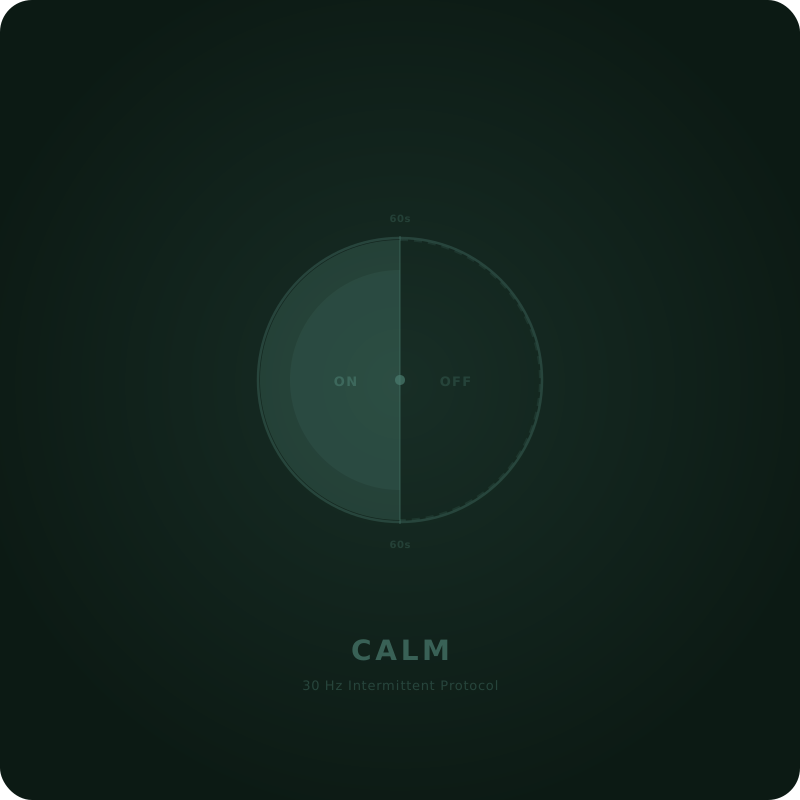
Half the session is stimulation. This is what Calm uses, and it is the most common cycling pattern in the literature.
60s on / 30s off asymmetric
Two thirds stimulation, shorter rests. This is Uplift. More total charge than 60/60 over the same session length.
5s on / 5s off breathing pace
Fast enough to breathe along with. Our app treats a 5/5 cycle as a breathing guide: in on the pause, out on the pulse.

Why pause at all

Give a nerve the same input for long enough and its response drops away. That is habituation, and it is the reason a long continuous session is not automatically better than a shorter cycled one. Pausing lets responsiveness recover, so the stimulation that follows lands on a nerve that is still listening.

Duty cycling is also simply more comfortable for many people. A rest every minute is easier to sit through than twenty unbroken minutes, which matters more than it sounds: the protocol you actually finish beats the one you abandon.

Any legal pair, checked as you type

The device has one rule here: on and off must be either both zero or both non-zero, and anything non-zero is five seconds or more. There is no such thing as a session that stimulates for sixty seconds and rests for nothing, and nothing below five seconds exists on the hardware at all.

So the configurator gives you two free number fields and enforces that rule as you type. Following a paper that cycles 7 on / 13 off? Enter exactly that - it is as valid as 60/60. Type a pair the hardware cannot run and the order button switches off with a plain explanation until the numbers describe a real session, so an impossible combination never reaches your basket.

Session length is set separately

Duty cycle is the rhythm; session length is how long the rhythm runs. Set anything from one minute to an hour - to the second, so a 22.5 minute protocol is entered as 1350, not rounded - or continuous for a session with no scheduled end. The two settings combine: 20 minutes at 60s on / 30s off gives you roughly thirteen minutes of stimulation across about thirteen bursts. The device screen shows the resulting spec so you can confirm what loaded is what you configured.


Sharing a protocol with someone

Every configuration has a Tone Code - a short reversible encoding of the settings themselves, including the device label. Send someone the link and this page opens with those exact settings already chosen. The code is case-sensitive, carries the settings and nothing else, grants no access on its own, and anyone may generate one.

Tone Code —
Link

Reflects whatever is selected in the configurator above. Change a setting and this updates.

Or let us email it for them

We will send the link straight to their inbox, from us, with your name on it so they know who it is from.


Community

Tones other people are using

Real configurations from real users. Load any of these into the configurator above, adjust or order as-is.

No tones posted yet. Be the first.

Post your tone
Tell people what you built and why. Reviewed before publishing.

Configure a tone above first. Once the settings are valid, you can post it here.


Load a Tone in 60 Seconds

No cables. No complicated setup. Purchase, sync, stimulate.

1

Purchase

Buy a Tone here. It appears instantly in your Vagal Tones app account.

2

Sync to Device

Open the app, connect via USB or Bluetooth, and transfer the Tone to your stimulator.

3

Stimulate

Select your new Tone on the device and begin your session. That's it.


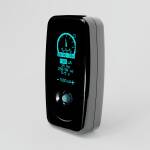
Using Tones with Buddy

Pick your Tone with one thumb

Buddy holds three Tones at a time and lists them on its screen. Once this Tone is loaded, switching to it takes a second, and you never need your phone to do it.

  1. 1

    Load it

    Sync the Tone to Buddy in the Vagal Tones app. You decide which three Tones Buddy carries.

  2. 2

    Nudge to highlight

    Push the joystick up or down to move through your Tones.

  3. 3

    Press to choose

    Push the joystick in. Buddy goes straight to the session timer, ready to start.

Close-up of Vagal Buddy as the joystick is nudged and the highlight moves from Balance to Gentle Rhythms
2Nudge to highlight
Vagal Buddy screen scrolling through three Tones, then opening the 15 minute session timer after the joystick is pressed
3Press to choose

30 customers Share your experience

Explore More Tones


Tones FAQ

Everything you need to know about Vagal Tones

Why has the app changed its name? Do I need to reinstall it?

We have completely rebuilt the app in Flutter with a focus on Bluetooth connection stability and a smoother overall experience. As part of this, the Android version has a new listing on Google Play under the name Vagally Better. If you are on Android, you will need to install the new app -- it will not update automatically from the old version. We recommend uninstalling the old app once you have the new one set up. If you are on iPhone or iPad, the iOS app will update through the App Store as normal -- you do not need to do anything. The iOS version will also be renamed to Vagally Better in a future update, but the app will continue to work exactly the same regardless of the name shown.